Introduction to Voice Agents
Building a simple agent with Pipecat
First, a few words
Hi, my name is Álvaro Trancón, and I've been building software for over 8 years. After studying Psychology I decided to switch careers and found my passion working with code; after all machines are quite simpler than people and you're guaranteed to get deterministic results. Most of my experience has been in building web applications with a focus on the backend. At this point I want to thank Pau twice, once for giving me the opportunity to work at Factorial and second for creating this platform! ;-)
Technology evolves, and with the arrival of Chat GPT and LLMs to the general public a new world of tools and applications has opened up. These last months I’ve worked at Quintess building voice agents aimed at mechanical operations. Funny thing I mentioned before my preference for determinstic results, now I'm back with working with things that are never the same twice.
And though I was fired recently (just a day ago) for understandable reasons, I want to take the learnings of this short stint and show that the beginning of the learning curve for a developer with some experience it’s quite easy (but very hard to master).
I don't consider myself any expert regarding AI, but after a few months working with it I feel like I know enough to explain the basic concepts to other people, and this article is my attempt at doing so. Also, with the speed everything is changing, maybe in one year this is completely outdated. Anyway, let's get into it.
Table of Contents
1. What’s a Voice Agent
- How inference works
2. The Project
- Burger Order Taker
- How to run it
- Functions
- State
- Prompts
- Event handlers
3. Finishing thoughts
What's a Voice Agent
Simplifying to the extreme, a voice agent it's a "chatGPT" with extra Large Language Models (LLMs). This is my own definition so take it with a grain of salt, but I define it as a program that interacts with one or more users through audio instead of a screen in real time, uses LLMs for content generation and may (or not) interact with other programs or agents. We could argue that the old "Press 1 or say yes to continue" phone bots are voice agents, but since they're responses are prerecorded I think is reasonable to exclude them.
Pipecat is an open source Python framework for easily building voice agents in a "plug and play" philosophy regarding the different providers (more on this later). At the end of the day a voice agent is a piece of software (running locally or in the cloud) with the following lifecyle.
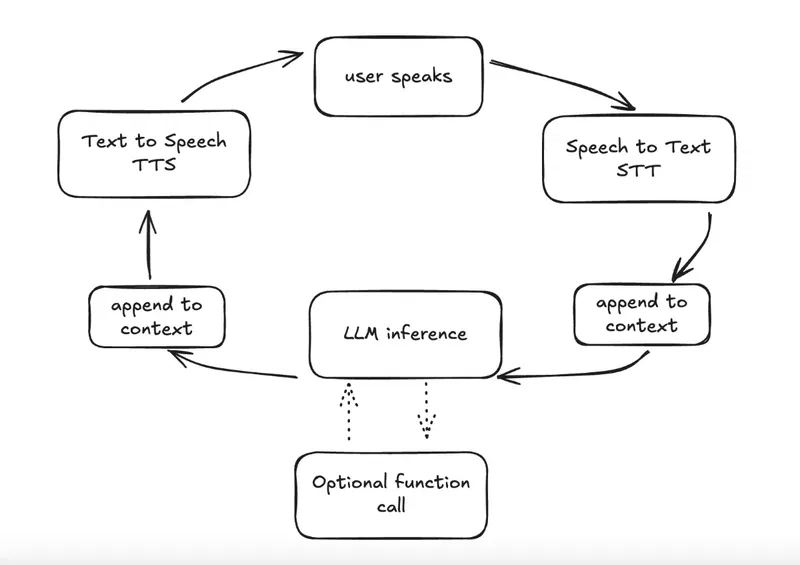
Open a communication channel. This could be via WebRTC, Web Sockets or other channels. Daily (the creators of Pipecat) provide easy to integrate virtual rooms.
Using an initial "context" prompt defined by the developer (setting the agent's persona and instructions), begin the conversation when the user connects. From here on the loop goes like this:
The user speaks, and their audio is captured by the device.
The audio is transcribed into text (Speech to Text, or STT).
The transcribed text along with the initial prompt and conversation history is sent to an LLM. Note: conversations can "degrade" over time since the context window is limited - the more tokens or words, the lower the quality beyond a certain point.
The LLM generates a text response. At this point, it can also trigger function calls to execute code, if defined.
The text response is converted to audio and delivered to the user (Text to Speech, or TTS). We can config different parameters for this stage, like the voice used or the speech speed.
The loop repeats for each turn.
After the conversation ends (user disconnects, program finishes, or another event occurs), custom code may be executed depending on your requirements.
There are many different providers for these stages: for example Google offers the 3 services, while others like Deepgram excel at one or two things. The good thing about Pipecat is that there's support for many and it's very easy to switch between them.
How inference works
Each time the user speaks, the entire conversation history is sent to the LLM along with the new transcribed text. The conversation is structured as a list of messages with different roles:
system: The initial prompt defining the agent's role and instructions
user: What the customer says, transcribed from audio
assistant: The agent's previous responses
This message history grows with each turn, and even though current context windows (the maximum amount of text, measured in tokens, that a LLM can process at one time) are quite big, this means we could reach the limit. There are techniques to manipulate the context, but they are not in the scope of this article.
DISCLAIMER: From this point of the article on, I've used gen AI tools to help me write both text and code (not blindly pasting results and letting agents run free). It is my belief that like any other tool they are useful, but they are best used as a "crutch" to deal with some aspects of work. I could extend myself but I think there's material for another article.
The Project
To demonstrate how to use Pipecat, we're going to build a very simple voice agent, acting as burger restaurant employee. It's job is to take an order from a customer using only items from a catalog, read back the price to confirm and create the order.
The repository is available to clone here: https://github.com/A-Tr/burger-bot
B.O.T.: Burger Order Taker
The starting point of this agent comes from the official quickstart available at Pipecat docs. At its core, a Pipecat bot consists of:
Transport: Handles the communication channel (WebRTC, Daily, etc.)
STT Service: Converts speech to text (Deepgram)
LLM Service: Generates responses (I used Google)
TTS Service: Converts text to speech (I used Cartesia). When you sign up, where you have a playground to test different voices; they are suited for different languages.
Pipeline: Connects all components in a processing chain
Here's a simplified version of what a basic Pipecat bot looks like:
  from pipecat.pipeline.pipeline import Pipeline
from pipecat.pipeline.runner import PipelineRunner
from pipecat.pipeline.task import PipelineTask
from pipecat.services.deepgram.stt import DeepgramSTTService
from pipecat.services.google.llm import GoogleLLMService
from pipecat.services.cartesia.tts import CartesiaTTSService

# Initialize services
stt = DeepgramSTTService(api_key="your_key")
llm =  GoogleLLMService(api_key=os.getenv("GOOGLE_API_KEY"), model="gemini-2.5-flash")
tts = CartesiaTTSService(api_key="your_key")

# Create pipeline
pipeline = Pipeline([
    transport.input(),  # User audio input
    stt,                # Speech to text
    llm,                # LLM processing
    tts,                # Text to speech
    transport.output(), # Bot audio output
])

# Run the bot
task = PipelineTask(pipeline)
runner = PipelineRunner()
await runner.run(task)
This project extends this basic pattern by:
Adding session state management for tracking orders
Registering custom functions that the LLM can call
Make some API calls to load the catalog and create orders
Loading a system prompt that defines the agent's personality and behavior injecting the catalog from the previous step.
Register event handlers to trigger actions during agent lifecycle
You can check the full file in bot.py.
Enough chit chat, I want to see it work
For a voice agent to work, you need a way to connect to the user and transmit audio. Thankfully, the Pipecat library provides us with the package pipecat.runner.run for local development. This packages exposes a main method, which under the hood and with the default configuration; creates a WebRTC server an a simple frontend to connect to.
The only rule for this is to work, is that the bot file must have a bot method.
async def bot(runner_args: RunnerArguments):
Get some API keys, install dependencies and start the bot with uv run bot.py. Navigate to http://localhost:7860/client and you will be greeted with a simple interface to connect to the agent and some interesting info, like conversation transcripts.
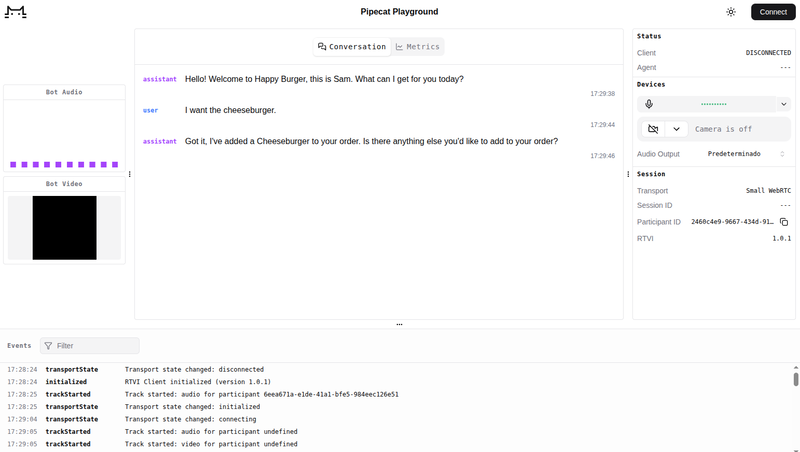
Important stuff
Functions
Functions (or tool calls) allow the LLM to execute deterministic code during the conversation. In our burger bot, you can check them at /functions folder in the project.
Each function has two components:
Schema: Defines the function signature (name, description, parameters) that tells the LLM when and how to call it
Handler: The actual code that executes when called, returning a string response. Every function takes a Pipecat
FunctionCallParamsobject, which contains the function arguments specified in the schema. We also use the methodparams.result_callbackto send the data we get from our function to the LLM.
Functions need to be added to the tools schema and registered within the LLM service:
  # Create function instances with session state
add_item_function = AddItemToOrderFunction(session_state, catalog)
# ... other functions

# Collect all functions
agent_functions = [add_item_function, ...]

# Create tools schema from function schemas
tools = ToolsSchema(standard_tools=[func.get_schema() for func in agent_functions])

# Create context with tools
context = LLMContext(messages, tools)

# Register function handlers with LLM
for func in agent_functions:
    llm.register_function(func.name, func.get_handler())
The agent decides when to call these functions based on the instructions in the system prompt and the conversation . This is the "non-deterministic meets deterministic" aspect: the LLM decides when to call functions (guided by the prompt), but the functions themselves execute deterministically.
Session state
We use a typed model, SessionState, to store the order items since it provides type safety, validation out of the box.
  class OrderItem(BaseModel):
    """Represents an item in the customer's order."""
    item_id: str
    quantity: int
    name: str
    price: float

class SessionState(BaseModel):
    """Session state for tracking the customer's order."""
    order_items: List[OrderItem] = Field(default_factory=list)

    def clear_order(self) -> None:
        """Clear all items from the order."""
        self.order_items = []

    def add_item(self, item: OrderItem) -> None:
        """Add an item to the order, or update quantity if item already exists."""
        # ... implementation
This helps a lot when we need to be deterministic (if a user adds a burger, we need to make sure that a single burger is in the order). Instead of relying on the LLM to remember the order (which could be inconsistent or forgotten), we store it in our typed structure. When the LLM calls read_current_order(), it reads from this state, not from its own memory. This ensures that order totals, item lists, and confirmations are always accurate and consistent, regardless of how the conversation flows or how many tokens have been used. The Pydantic model also provides validation (e.g., ensuring quantities are positive) and helper methods for common operations like calculating totals or clearing the order.
Prompts
A good system prompt defines the agent's identity, the goal to be achieved, and the steps to do so. It’s also recommended to include “style” instructions to make the llm “aware” that it’s messages are to be outputted to a TTS model.
Our burger bot, is an employee name Same whose the task is taking orders and has some methods available to use the order with.
Here's a snippet showing the structure:
  # Identity
You are **Sam**, a friendly and helpful employee at Happy Burger...

# Task
Capture the customer's order by listening to what they want...

# Conversation flow - CRITICAL PATH

**1. Greeting & Order Taking**
- Start with a warm greeting: "Hello! Welcome to Happy Burger..."
- Use the **add_item_to_order** function when the customer mentions items...

**2. Ask for Additional Items**
- Once the customer has finished telling you their initial order, ask...

**3. Read Back & Confirm Order**
- Use the **read_current_order** function to get the complete order summary...
Why detailed prompts matter: LLMs are non-deterministic—given the same input, they might respond differently each time. A detailed prompt with clear instructions, conversation flow, and function usage guidelines helps guarantee consistency in the conversation. Without explicit guidance, the agent might skip steps, forget to confirm orders, or use functions incorrectly. The prompt acts as a constraint, steering the agent toward the desired behavior pattern while still allowing natural conversation.
Event Handlers
Event handlers allow you to execute code in response to lifecycle events in the voice agent's execution. In Pipecat, you register event handlers using decorators. While the transport object is a common place to register handlers (for connection or disconnection events), other classes in the Pipecat framework may also expose event handlers for different lifecycle events.
In our burger bot, we handle two key events:
1. Client Connected
This event fires when a user first connects to the voice agent.
  @transport.event_handler("on_client_connected")
async def on_client_connected(transport, client):
    logger.info("Client connected")
    await task.queue_frames([LLMRunFrame()]) # <- LLMRunFrame is what makes the LLM generate a message
The LLMRunFrame() tells the LLM to generate a message the moment the client connects. Since the only message in context is the system_prompt, it will generate the greeting. Without this, the agent would wait for the user to speak first, which might feel awkward.
2. Client Disconnected
This event fires when the user disconnects or the session ends. It's the perfect place for cleanup:
  @transport.event_handler("on_client_disconnected")
async def on_client_disconnected(transport, client):
    logger.info("Client disconnected")
    await api_client.close()
    await task.cancel()
DISCLAIMER: Here I stop using AI.
Finishing thoughts
I hope that this has been as entertanining for you to read as it was for me to write it and that you’ve learned something along the way.
My initial idea was to only write this article, but since now I’m going to have much more free time, there’s some topics regarding voice agents that deserve their own article.
How can we “test” voice agents and make sure they work as expected? The wonderful world of evals
Support for other languages apart from English
Types of transports and how to connect with them
Dynamic context switch
Creating you own Frontend to connect the agent
Thanks for reading this, see you soon.
Comments
No comments yet. Be the first to comment!